The filings tab enables you to quickly find and analyze company filings, including annuals, interims, transactional filings, prospectuses, and much more.
You can find the filings tab under News, research and Filings when on a company page.
This will provide an overview and should enable you to find most of what you need for further detail.
You can search for the filings tab on your workstation, or by going to the FactSet search bar at the top, you'll be able to find all FactSet applications through this search for the company security tab.
All the filings are displayed in the default tiling view and categorized by annuals, interims, corporate releases, and more.
You can toggle this search by clicking the chronological view up at the top here.
This will display the files in order of their release date.
If I now go to the filings tab, I can edit the search with the search bar up at the top here.
This allows me to search for a company, company identifier or portfolio.
The type of head search will display a list matching. As you start typing. You then just need to select your chosen item either by clicking or with the arrow, keys and enter button.
You can quickly bring up old searches by clicking the arrow key next to the search bar.
Below you can see all the filings for the chosen entity.
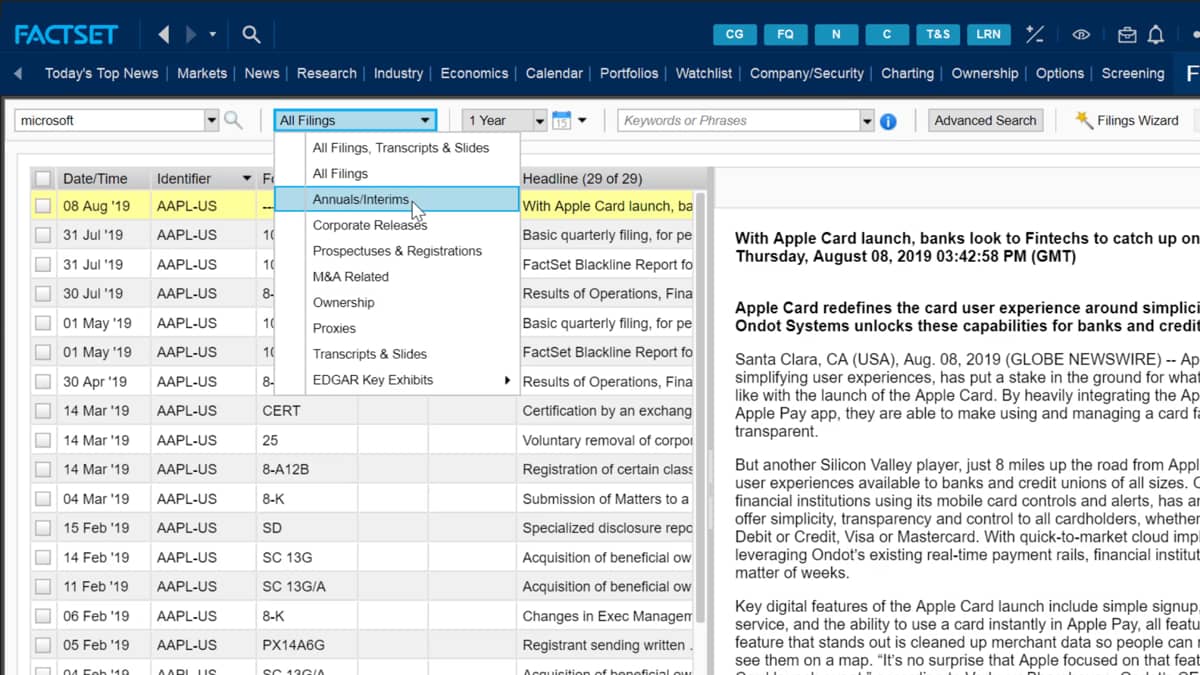
In my case, apple. If I select the dropdown bar here, I can make restrictions on my search to only show certain filings of my choice.
I may only want to view the annuals, for example, and can apply this search criteria by selecting it to further narrow it down the search.
I can also select which period I want to make the reports for.
I can choose a period of time with the dropdown box, or I have the option of selecting an array of dates from the calendar.
Whichever report I select will be loaded on the right hand side for me to view.

 Factset-keyboard-shortcuts-for-Excel