The economics tab allows you to analyze global economic data, review economic events in the event calendar, and analyze detailed reports for different countries and regions.
By default, the tab will not show on your toolbar, however, you can find the tab either by searching with the FactSet search bar, or you can add it into your toolbar by selecting the blue plus icon found here.
This will bring up the search applications window.
You then only need to find it and add it in.
The tab is split into five subtopics.
All of these can be accessed at this top toolbar.
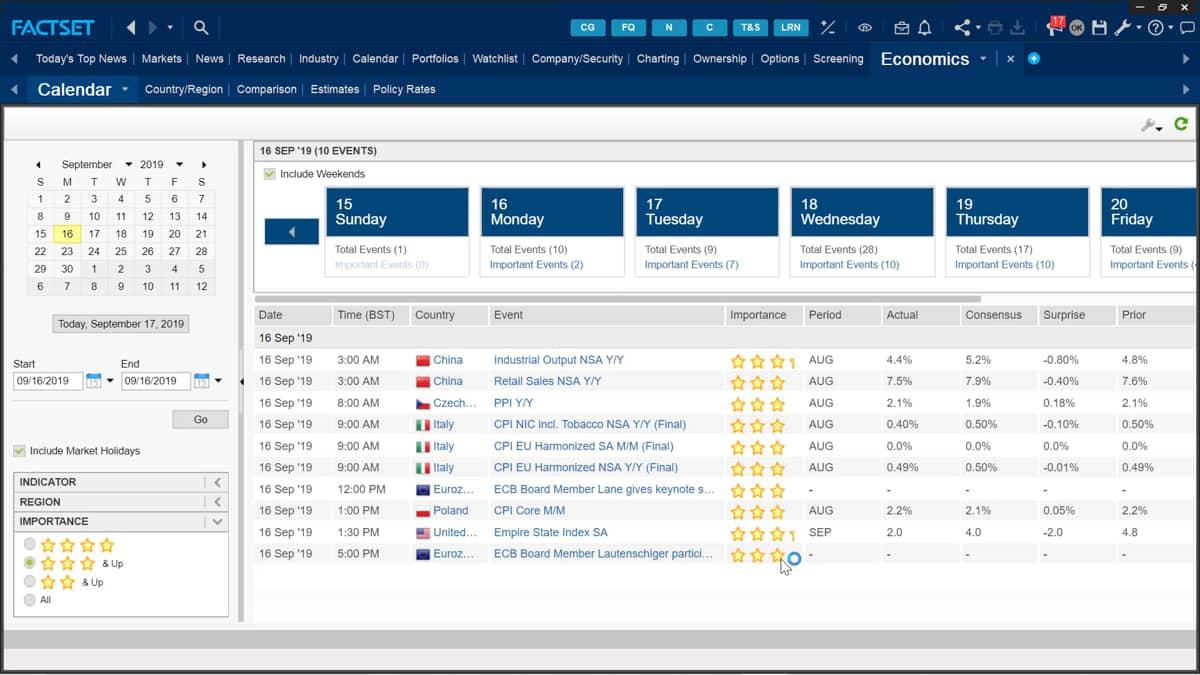
The calendar icon shows recent and upcoming economic events.
All events are listed in date order and include a synopsis of the country's affected name of the event and a rating of the importance.
The list displayed can be updated by changing the start and end date.
Use the calendar icons to select new dates.
Once the new dates are added, you only need to press go and this will run the new criteria.
Alternatively, you can click the today button up at the top, and this will update the list of events for your current date.
The Country Region tab provides a detailed report for specified countries or regions.
Entering the identifier at the top will bring up all the fact sets data.
The reports are all filed on the left hand side.
In this menu, you can find information on the company's GDP Treasury Curve, unemployment, and even credit ratings plus much more.
The comparison tab allows you to compare specific data items between countries.
You can toggle if you want to compare just a single item or multiple with the dropdown menu Here, change the items.
You want to compare by searching and adding across in the table.
The table is formatted based on which data items you select and their order.
You can rearrange this order by dragging the items and even remove data with the arrows in the middle.
Once the table is complete with your items, just click okay and it will update the table.
By default, the table is showing a list of all world total countries.
You can edit this list by going to the geographies button, and this will present this customizable window.
This now lets you add or remove countries to include in your reports.
You only need to press okay to update the table with your selected countries.
The data is presented as monthly reports.
Edit the data range with the dropdown menu.
Here you can choose daily all the way up to yearly reports.
The reports will always show latest available data, but this can be changed with the calendar icon. Here, the Estimates tab provides annual estimates for key economic concepts for each country.
Choose to only present the table for single data items or multiple.
By selecting multiple, you can edit the table in the tab by selecting change data items.
The following window appears allowing you to add or remove data items and change the formatting of all the items.
Currently, the single item is providing a report for the real GDP growth.
Selecting a forecast figure allows you to see further information.
I can select broker Outlook to be provided on which brokers make up the estimates in the table.
The final tab is the policy rates.
This shows reports on current central bank monetary policy rates for different countries.
The tab also includes both recent and upcoming rate changes.

 Factset-keyboard-shortcuts-for-Excel