The BlackLine Now tool allows you to quickly compare two Edgar files across different periods to compare what changes have been made between the two reports.
This feature allows you to compare the difference between 10 K reports from say 2019 to the report from 2018.
To use this feature, you need to start by selecting two reports to compare, and you will notice the Black Line Now feature at the top right now appears it'll only work by selecting two forms of the same type.
I can now click the Black Line Now feature and this will display this box here.
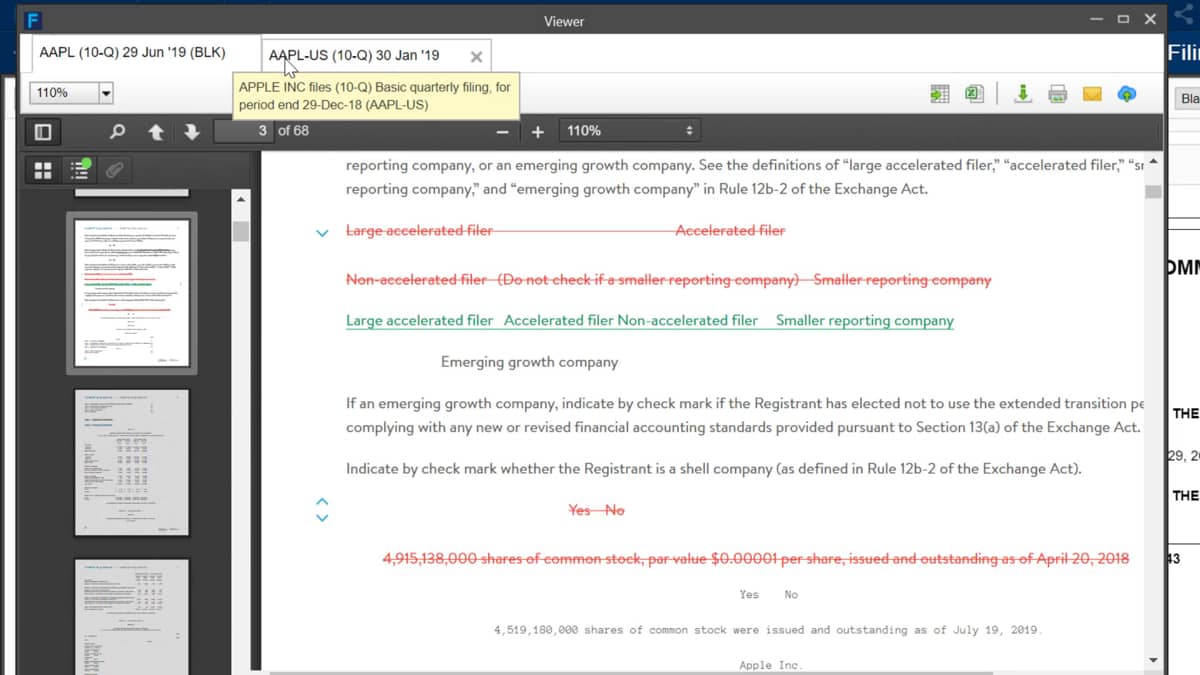
The first page we can see is the number of additions, deletions, and changes which have been made between the prior and most current reports.
I can keep scrolling through the report to be quickly shown what changes have been made.
This might save me hours if I only want to find a small accounting policy change as an as an example, the BlackLine Now option can also be used for a report already open in the document viewer tab.
Once you are on your selected document, you only need to open an additional reports from the viewer sidebar and select BlackLine.
Now from the dropdown box on the right.

 Factset-keyboard-shortcuts-for-Excel