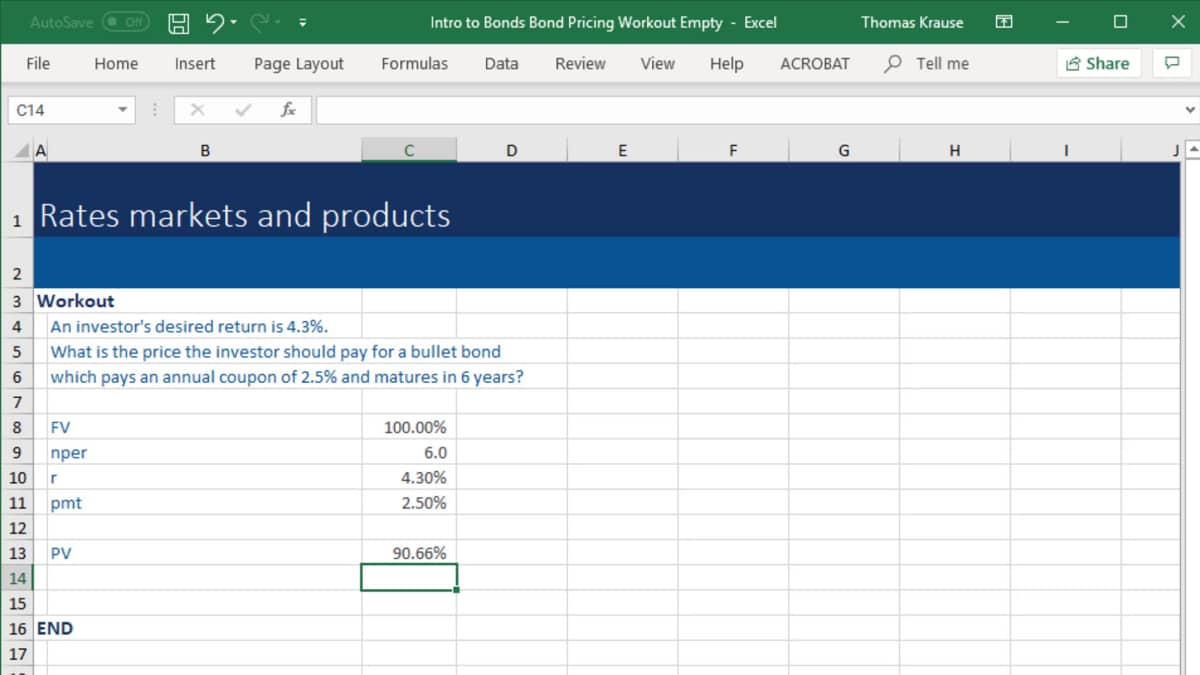
In this workout, we've been asked to price a bond, more specifically, a six year bond which pays an annual coupon of two and a half percent. If we wanna use Excel's PV function, we need a couple of values here, and let's start with the face value. Now, we could enter an absolute amount here but as we've been asked to calculate the bond price, which is given, usually, as a percentage rate, let's use percentages here as well. And of course, in case of face value, this has to be 100%. The number of periods should be six, as it is a six year bond with annual payments. The desired rate has been given to us with 4.3%, and the payment per period is equal to the coupon rate, in this case, which has been given with two and a half percent. So let's apply the PV function now, so equals -pv, at then starting with the desired rate number per of periods then the payment per period, followed by the face value, close the bracket, and that's it. The bond price should be 90.66%.

 Intro-to-Bonds-Bond-Pricing-Workout-Empty
