In this workout, we're asked to calculate the day's difference between the acquirer's year end and the target's year end.
The acquirer has a year end of the 25th of September 17.
So the difference between them, if I take the acquirer minus the target, it's 97 days earlier.
I've now got the acquirer and target's, year ends for the prior year, current year, and then year plus one and two.
You might notice we've used the date, year, month, and day functions.
The day's difference is the same.
97 here, and we are now asked what percentage of the targets prior year, next year and current year is included or needs to be included.
If we're going to calendarize to the acquirer's year end, well, the acquirer's year is the 12 months to the 25th of September.
That means I'm going to need approximately nine months of the targets current year, and I'm going to need approximately three months of the targets prior year.
I won't need any of the targets next year figures.
So how do we calculate that? Well, I'm going to use the minus min for my prior year.
I'm gonna take that 97, divide it by 365 and make it the minus min of all of that and zero.
When it comes to next year, I can use that max function the same, negative 97 to divided by 3, 6, 5, and zero.
That's gonna come out as 0%.
The remainder is what goes into the current year.
So I'd say one minus those two percentages above.
Give me approximately nine months for the current year, approximately three months for the prior year.
Let's take that down into out one C.
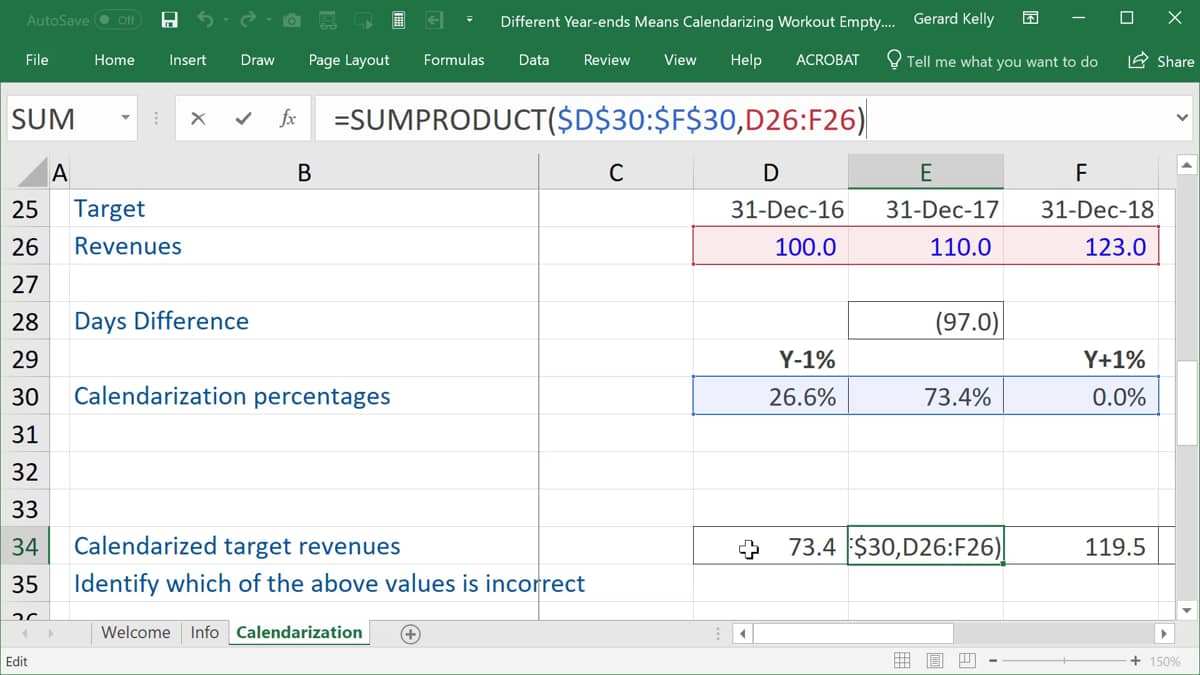
Now my day's difference again is just that 97 that we've already seen and my calendarization percentages we just calculated prior year 26, next year zero and the current year, 73.4%.
So now let's calculate the calendarized target revenues.
I'm gonna start in year zero. In year zero.
I can use my sum product formula to choose my first array.
I'm gonna lock that because what I'm gonna do is I can copy this to the left and right in just a second, and I'll always want 26.6% of the year prior to the one I'm in and 73% of the year I'm in and now need to go and find those figures to multiply them by.
So I go looking for the targets figures last year, this year, and the year ahead.
Fantastic. I've now got the calendarized target revenues in year zero of 107.3.
I can copy that to the right and I can also copy and paste that to the left.
But there's one more question.
Identify which of the above values is incorrect.
Well, if I look at year zero, nothing looks bad there, but if I look at year minus one, oh dear, oh dear. We seem to be including an empty cell, so that's definitely an incorrect calculation there.
If I had the figure for 31st December 15, it would be okay.
Year zero is fine. Year one is fine.
But as we then go to the right into year plus two, oh dear, again, we have an incorrect cell, so do be very careful when categorizing.
There is often going to be this problem that we end up including cells that we don't want.

 Different Year-ends Means Calendarizing Workout Empty
