Let us now have a look at how to implement the select distinct statement in Oracle SQ Developer.
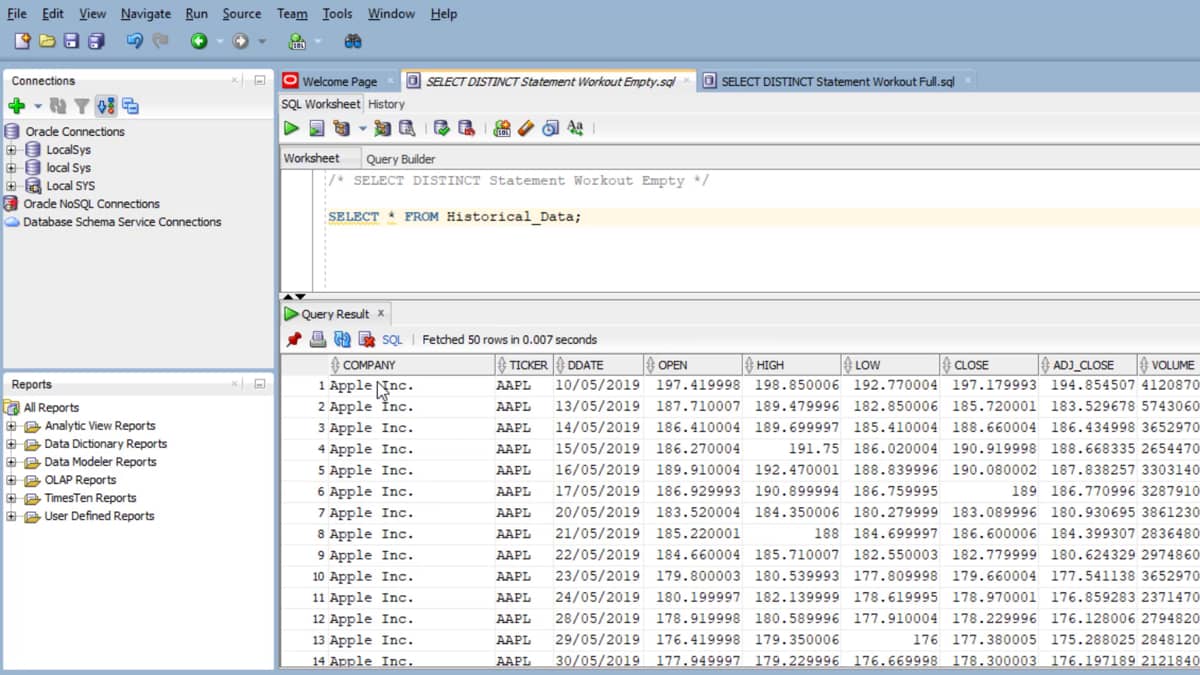
To start with, let us have a look at the data table, which is the historical data.
To access this data table, we use the select option or the select statement.
And because we want all the columns, we use a star from historical data, and let's end this with a semicolon.
We run the statement either using the shortcut, which is control enter, or the option on the top left hand side of the id, which is the one statement option.
If you look at the output at the bottom of the screen, this gives us all the data values.
It has a company name, ticker data, and all the other values.
One thing we know is that the ticker values un duplicates cause there are more than one ticker values.
In order to get unique ticker values, we use to select listing statement.
So this would be select this thing and let's select the column, which is sticker from historical data.
And let's end this with a semi-colon.
We can run the statement by using the shortcut, which is control enter.
There you go. The output of the statement is the ticker values and these other unique ticketer values.
We know that the tickers in this dataset are JPM, Google, Amazon, Goldman Sachs, Microsoft, and Apple.
In order to get the count of the ticker values, we just have to use the count at the start of the distance statement.
So this would be code and we need to put the distinct ticker in brackets.
And once we run this, it would give us the count of the tickers, which in this case are six.
In a similar manner. We can get the count of the opening values, opening, share price value, and which is 126.
And that's the same case with any other colony.

 SELECT-DISTINCT-Statement-Workout-Files
