Skip to content
Felix
  • Topics
    • My List
    • Felix Guide
    • Asset Management
    • Coding and Data Analysis
      • AI
      • Data Analysis and Visualization
      • Financial Data Tools
      • Python
      • SQL
    • Credit
      • Credit Analysis
      • Restructuring
    • Financial Literacy Essentials
      • Financial Data Tools
      • Financial Math
      • Foundations of Accounting
    • Industry Specific
      • Banks
      • Chemicals
      • Consumer
      • ESG
      • Industrials
      • Insurance
      • Oil and Gas
      • Pharmaceuticals
      • Project Finance
      • Real Estate
      • Renewable Energy
      • Technology
      • Telecoms
    • Introductory Courses
    • Investment Banking
      • Accounting
      • Financial Modeling
      • M&A and Divestitures
      • Private Debt
      • Private Equity
      • Valuation
      • Venture Capital
    • Markets
      • Economics
      • Equity Markets and Derivatives
      • Fixed Income and Derivatives
      • Introduction to Markets
      • Options and Structured Products
      • Other Capital Markets
      • Securities Services
    • Microsoft Office
      • Excel
      • PowerPoint
      • Word & Outlook
    • Professional Skills
      • Career Development
      • Expert Interviews
      • Interview Skills
    • Risk Management
    • Transaction Banking
    • Felix Live
  • Pathways
    • Investment Banking
    • Asset Management
    • Equity Research
    • Sales and Trading
    • Commercial Banking
    • Engineering
    • Operations
    • Private Equity
    • Credit Analysis
    • Restructuring
    • Venture Capital
    • CFA Institute
  • Certified Courses
  • Ask An Instructor
  • Support
  • Log in
  • Topics
    • My List
    • Felix Guide
    • Asset Management
    • Coding and Data Analysis
      • AI
      • Data Analysis and Visualization
      • Financial Data Tools
      • Python
      • SQL
    • Credit
      • Credit Analysis
      • Restructuring
    • Financial Literacy Essentials
      • Financial Data Tools
      • Financial Math
      • Foundations of Accounting
    • Industry Specific
      • Banks
      • Chemicals
      • Consumer
      • ESG
      • Industrials
      • Insurance
      • Oil and Gas
      • Pharmaceuticals
      • Project Finance
      • Real Estate
      • Renewable Energy
      • Technology
      • Telecoms
    • Introductory Courses
    • Investment Banking
      • Accounting
      • Financial Modeling
      • M&A and Divestitures
      • Private Debt
      • Private Equity
      • Valuation
      • Venture Capital
    • Markets
      • Economics
      • Equity Markets and Derivatives
      • Fixed Income and Derivatives
      • Introduction to Markets
      • Options and Structured Products
      • Other Capital Markets
      • Securities Services
    • Microsoft Office
      • Excel
      • PowerPoint
      • Word & Outlook
    • Professional Skills
      • Career Development
      • Expert Interviews
      • Interview Skills
    • Risk Management
    • Transaction Banking
    • Felix Live
  • Pathways
    • Investment Banking
    • Asset Management
    • Equity Research
    • Sales and Trading
    • Commercial Banking
    • Engineering
    • Operations
    • Private Equity
    • Credit Analysis
    • Restructuring
    • Venture Capital
    • CFA Institute
  • Certified Courses
Felix
  • Data
    • Company Analytics
    • My Filing Annotations
    • Market & Industry Data
    • United States
    • Relative Valuation
    • Discount Rate
    • Building Forecasts
    • Capital Structure Analysis
    • Europe
    • Relative Valuation
    • Discount Rate
    • Building Forecasts
    • Capital Structure Analysis
  • Models
  • Account
    • Edit Profile
    • Manage Account
    • My List
    • Restart Homepage Tour
    • Restart Company Analytics Tour
    • Restart Filings Tour
  • Log in
  • Ask An Instructor
    • Email Our Experts
    • Felix User Guide
    • Contact Support

Pandas

Create and manipulate Pandas and DataFrames. Create and manipulate Pandas Series. Filter data using Boolean Masks. Segment and summarize data by class with groupby's.

Unlock Your Certificate   
 
0% Complete

18 Lessons (31m)

Show lesson playlist
  • Description & Objectives

  • 1. Pandas Learning Objectives

    00:27
  • 2. Pandas Introduction

    02:14
  • 3. Importing Data

    02:49
  • 4. Import From.csv

    01:32
  • 5. Get to Know Your DataFrame

    00:59
  • 6. DataFrame Workout

    02:20
  • 7. Summary Statistics

    01:47
  • 8. Summary Statistics Workout

    01:14
  • 9. Series

    02:13
  • 10. Series Functions

    01:01
  • 11. Feature Engineering

    00:58
  • 12. Series Functions & Feature Engineering Workout

    02:12
  • 13. Boolean Masks

    03:47
  • 14. Indicator Variables

    02:57
  • 15. Boolean Mask Workout

    01:45
  • 16. Segmenting with .groupby

    01:56
  • 17. Groupby Function Workout

    01:00
  • 18. Pandas Review

    00:14

Prev: NumPy

Indicator Variables

  • Notes
  • Questions
  • Transcript
  • 02:57

How to convert categorical variables into numerical inputs for machine learning algorithms by creating an indicator variable.

Downloads

No associated resources to download.

Glossary

Indicator Variables Pandas Python
Back to top
Financial Edge Training

© Financial Edge Training 2025

Topics
Introduction to Finance Accounting Financial Modeling Valuation M&A and Divestitures Private Equity
Venture Capital Project Finance Credit Analysis Transaction Banking Restructuring Capital Markets
Asset Management Risk Management Economics Data Science and System
Request New Content
System Account User Guide Privacy Policy Terms & Conditions Log in
Transcript

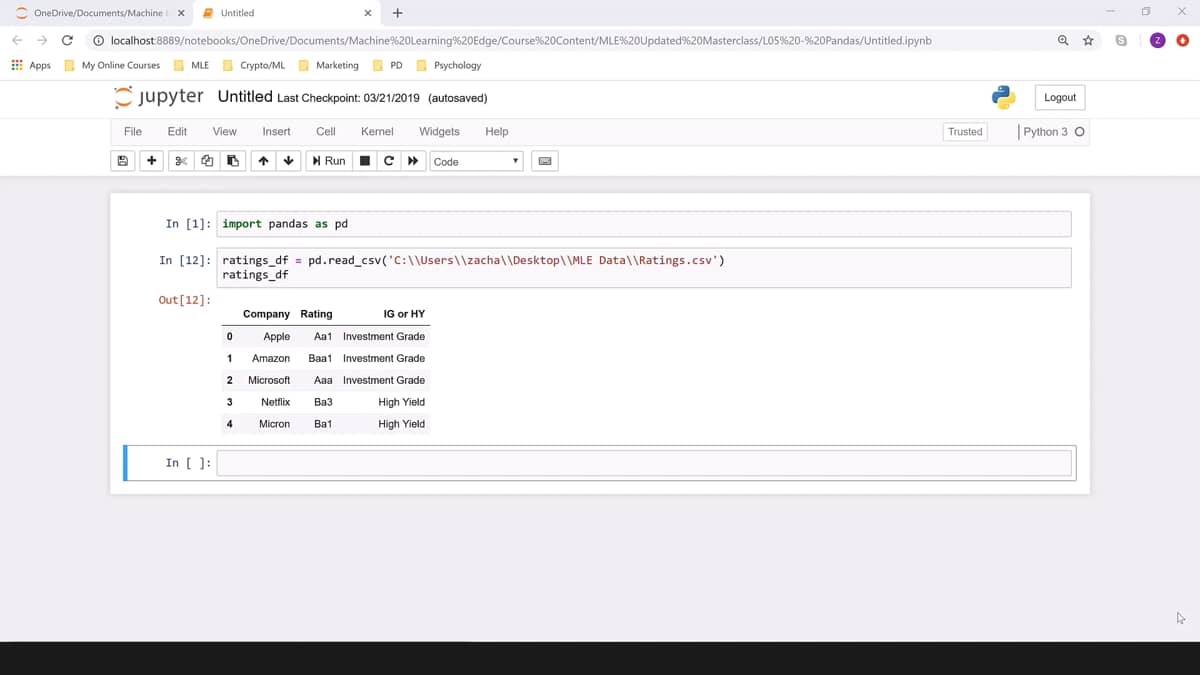
In machine learning as you're using these open source packages, you're going to need to use numerical inputs for all of your algorithms. And that means when you're using categorical variables like you see here, investment grade or high yield, you're going to need to convert that into a number. We do that by creating, in this case, what's called an indicator variable that tells you whether a condition is met or not. So in this case, we might assign investment grade to one, the positive case and high yield to zero, the negative case. So our indicator variable is I indicating whether this company is investment grade or not. In this case, creating a normal Boolean mask doesn't work because your outputs are the words true and false instead of one and zero. But there's an easy way for us to fix that. So here I'm creating a Boolean mask, which is just a panda series, and I'm setting equal to our dataframe ratings df, and I'm specifically calling out the series IG or HY investment grade or high yield. And notice since that series has spaces in it, it works better for me to use the square brackets method of calling out that series. And I'm checking to see if it's equal to the string investment grade and notice that I'm using the double equal sign to check equality. When I print that Boolean mask, I get values of true and false, which are strings. I can easily convert this into integer zero in one so that my machine learning algorithms can interpret it. And I do that by going back and adding parentheses here around my Boolean mask.

And then I just write dot as type to change the type of object that I'm producing, and in parentheses INT for integer. So now when I create that Boolean mask and print it, I get ones for true and zeros for false. That gives me something that my machine learning algorithms can interpret.

So now I've created this Boolean mask, which I've named mask, and it has numeric values, ones and zeros in integer format so that my machine learning algorithms can interpret that variable.

Now, if I want to add it to my dataframe, I then create a new series in that dataframe. So here I've written ratings underscore df, the name of my dataframe, and then in square brackets I've written the name of the new series. I want to create IG indicator for investment grade indicator, and then I'm setting that equal to the Boolean mask. When I display ratings df, you can see that that IG indicator feature has now been added as a series to my dataframe.

Content Requests and Questions

You are trying to access premium learning content.

Discover our full catalogue and purchase a course Access all courses with our premium plans or log in to your account
Help

You need an account to contact support.

Create a free account or log in to an existing one

Sorry, you don't have access to that yet!

You are trying to access premium learning content.

Discover our full catalogue and purchase a course Access all courses with our premium plans or log in to your account

You have reached the limit of annotations (10) under our premium subscription. Upgrade to unlock unlimited annotations.

Find out more about our premium plan

You are trying to access content that requires a free account. Sign up or login in seconds!

Create a free account or log in to an existing one

You are trying to access content that requires a premium plan.

Find out more about our premium plan or log in to your account

Only US listed companies are available under our Free and Boost plans. Upgrade to Pro to access over 7,000 global companies across the US, UK, Canada, France, Italy, Germany, Hong Kong and more.

Find out more about our premium plan or log in to your account

A pro account is required for the Excel Add In

Find out more about our premium plan

Congratulations on completing

This field is hidden when viewing the form
Name(Required)
This field is hidden when viewing the form
Rate this course out of 5, where 5 is excellent and 1 is terrible.
Were the stated learning objectives met?(Required)
Were the stated prerequisite requirements appropriate and sufficient?(Required)
Were the program materials, including the qualified assessment, relevant and did they contribute to the achievement of the learning objectives?(Required)
Was the time allotted to the learning activity appropriate?(Required)
Are you happy for us to use your feedback and details in future marketing?(Required)

Thank you for already submitting feedback for this course.

CPE

What is CPE?

CPE stands for Continuing Professional Education, by completing learning activities you earn CPE credits to retain your professional credentials. CPE is required for Certified Public Accountants (CPAs). Financial Edge Training is registered with the National Association of State Boards of Accountancy (NASBA) as a sponsor of continuing professional education on the National Registry of CPE Sponsors.

What are CPE credits?

For self study programs, 1 CPE credit is awarded for every 50 minutes of elearning content, this includes videos, workouts, tryouts, and exams.

CPE Exams

You must complete the CPE exam within 1 year of accessing a related playlist or course to earn CPE credits. To see how long you have left to complete a CPE exam, hover over the locked CPE credits button.

What if I'm not collecting CPE credits?

CPE exams do not count towards your FE certification. You do not need to complete the CPE exam if you are not collecting CPE credits, but you might find it useful for your own revision.


Further Help
  • Felix How to Guide walks you through the key functions and tools of the learning platform.
  • Playlists & Tryouts: Playlists are a collection of videos that teach you a specific skill and are tested with a tryout at the end. A tryout is a quiz that tests your knowledge and understanding of what you have just learned.
  • Exam: If you are collecting CPE points you must pass the relevant CPE exam within 1 year to receive credits.
  • Glossary: A glossary can be found below each video and provides definitions and explanations for terms and concepts. They are organized alphabetically to make it easy for you to find the term you need.
  • Search function: Use the Felix search function on the homepage to find content related to what you want to learn. Find related video content, lessons, and questions people have asked on the topic.
  • Closed Captions & Transcript: Closed captions and transcripts are available on videos. The video transcript can be found next to the closed captions in the video player. The transcript feature allows you to read the transcript of the video and search for key terms within the transcript.
  • Questions: If you have questions about the course content, you will find a section called Ask a Question underneath each video where you can submit questions to our expert instructor team.