Skip to content
Felix
  • Topics
    • My List
    • Felix Guide
    • Asset Management
    • Coding and Data Analysis
      • AI
      • Data Analysis and Visualization
      • Financial Data Tools
      • Python
      • SQL
    • Credit
      • Credit Analysis
      • Restructuring
    • Financial Literacy Essentials
      • Financial Data Tools
      • Financial Math
      • Foundations of Accounting
    • Industry Specific
      • Banks
      • Chemicals
      • Consumer
      • ESG
      • Industrials
      • Insurance
      • Oil and Gas
      • Pharmaceuticals
      • Project Finance
      • Real Estate
      • Renewable Energy
      • Technology
      • Telecoms
    • Introductory Courses
    • Investment Banking
      • Accounting
      • Financial Modeling
      • M&A and Divestitures
      • Private Debt
      • Private Equity
      • Valuation
      • Venture Capital
    • Markets
      • Economics
      • Equity Markets and Derivatives
      • Fixed Income and Derivatives
      • Introduction to Markets
      • Options and Structured Products
      • Other Capital Markets
      • Securities Services
    • Microsoft Office
      • Excel
      • PowerPoint
      • Word & Outlook
    • Professional Skills
      • Career Development
      • Expert Interviews
      • Interview Skills
    • Risk Management
    • Transaction Banking
    • Felix Live
  • Pathways
    • Investment Banking
    • Asset Management
    • Equity Research
    • Sales and Trading
    • Commercial Banking
    • Engineering
    • Operations
    • Private Equity
    • Credit Analysis
    • Restructuring
    • Venture Capital
    • CFA Institute
  • Certified Courses
  • Ask An Instructor
  • Support
  • Log in
  • Topics
    • My List
    • Felix Guide
    • Asset Management
    • Coding and Data Analysis
      • AI
      • Data Analysis and Visualization
      • Financial Data Tools
      • Python
      • SQL
    • Credit
      • Credit Analysis
      • Restructuring
    • Financial Literacy Essentials
      • Financial Data Tools
      • Financial Math
      • Foundations of Accounting
    • Industry Specific
      • Banks
      • Chemicals
      • Consumer
      • ESG
      • Industrials
      • Insurance
      • Oil and Gas
      • Pharmaceuticals
      • Project Finance
      • Real Estate
      • Renewable Energy
      • Technology
      • Telecoms
    • Introductory Courses
    • Investment Banking
      • Accounting
      • Financial Modeling
      • M&A and Divestitures
      • Private Debt
      • Private Equity
      • Valuation
      • Venture Capital
    • Markets
      • Economics
      • Equity Markets and Derivatives
      • Fixed Income and Derivatives
      • Introduction to Markets
      • Options and Structured Products
      • Other Capital Markets
      • Securities Services
    • Microsoft Office
      • Excel
      • PowerPoint
      • Word & Outlook
    • Professional Skills
      • Career Development
      • Expert Interviews
      • Interview Skills
    • Risk Management
    • Transaction Banking
    • Felix Live
  • Pathways
    • Investment Banking
    • Asset Management
    • Equity Research
    • Sales and Trading
    • Commercial Banking
    • Engineering
    • Operations
    • Private Equity
    • Credit Analysis
    • Restructuring
    • Venture Capital
    • CFA Institute
  • Certified Courses
Felix
  • Data
    • Company Analytics
    • My Filing Annotations
    • Market & Industry Data
    • United States
    • Relative Valuation
    • Discount Rate
    • Building Forecasts
    • Capital Structure Analysis
    • Europe
    • Relative Valuation
    • Discount Rate
    • Building Forecasts
    • Capital Structure Analysis
  • Models
  • Account
    • Edit Profile
    • Manage Account
    • My List
    • Restart Homepage Tour
    • Restart Company Analytics Tour
    • Restart Filings Tour
  • Log in
  • Ask An Instructor
    • Email Our Experts
    • Felix User Guide
    • Contact Support

Modeling Case Study

Modeling in the Investment Banking Case Study.

Unlock Your Certificate   
 
0% Complete

11 Lessons (41m)

Show lesson playlist
  • Description & Objectives

  • 1. Modeling Case Study - Historical Subtotals

    03:25
  • 2. Modeling Case Study - Income Statement to Depreciation

    03:07
  • 3. Modeling Case Study - Income Statement from Depreciation

    03:22
  • 4. Modeling Case Study - Balance Sheet Assets

    02:50
  • 5. Modeling Case Study - Balance Sheet Liabilities

    02:44
  • 6. Modeling Case Study - Cashflow Statement Setup

    01:29
  • 7. Modeling Case Study - Cash Flow Statement Build

    05:37
  • 8. Modeling Case Study - Balancing the Balance Sheet

    04:54
  • 9. Modeling Case Study - Interest Calculations

    02:12
  • 10. Modeling Case Study - Circularity Example

    06:38
  • 11. Modeling Case Study - Circular Reference in the Model

    04:38

Prev: Accounting Case Study Next: DCF Valuation Case Study

Modeling Case Study - Balancing the Balance Sheet

  • Notes
  • Questions
  • Transcript
  • 04:54

How to wire the ending balance of the cash flow statement into the balance sheet using min and max functions. How to handle positive and negative cash balances and how they affect the cash and revolver lines.

Downloads

Balancing the Balance Sheet EmptyBalancing the Balance Sheet Full

Glossary

=MIN() Balance Sheet (BS) Cash and Revolver Cash Flow Statement Income statement MAX
Back to top
Financial Edge Training

© Financial Edge Training 2025

Topics
Introduction to Finance Accounting Financial Modeling Valuation M&A and Divestitures Private Equity
Venture Capital Project Finance Credit Analysis Transaction Banking Restructuring Capital Markets
Asset Management Risk Management Economics Data Science and System
Request New Content
System Account User Guide Privacy Policy Terms & Conditions Log in
Transcript

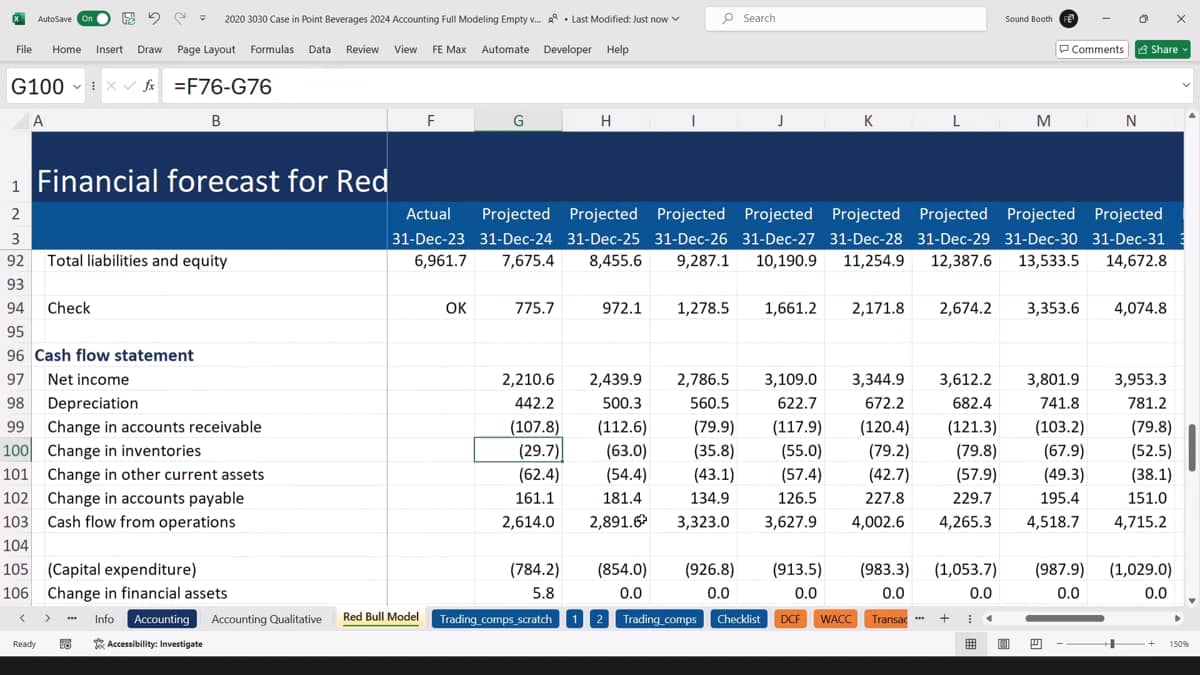
Now we've completed the cashflow statement. Our next step is to wire the ending balance of the cashflow statement into the balance sheet. And you can see right here we have a difference in 2024 of 775.7. That number should be exactly the same as the difference on the balance sheet, and it is, and we know that that means that when we wire that into the balance sheet, that is going to make it balance. If we take a look at the numbers down here, we can see they're all positive. And what that means is that the company we are forecasting, it's going to have a positive cash balance all the way through the forecast. However, if you change the assumptions, for example, if I make capital expenditure a really big percentage of sales, and I'm just doing this for illustrative purposes only, say 1,000 percent crazy, but just for illustrative purposes, at this point, the company will run out of cash. And so this balance now becomes negative. If it's negative, what that means is that the company will need to raise money, and we assume it will do it by borrow money and therefore issue of revolver. So if it's negative, it will be a revolver. If it's positive, it will be cash. I'm gonna undo that assumption change because I want to go back to the normal set of assumptions that we had previously. In order to make this flexible, I could use an if statement. I could say, if my cash balance is positive, pull it into cash. If it's negative, pull it into revolver and then flip the sign to make the revolver positive. But most people in modeling use a slightly more elegant solution, and that's using a min or max function. So for the cash line, I'm going to say give me the maximum of the number at the bottom of the cash flow statement. But before you take it, just compare it to 0. So it will take the maximum of that number in 0. So if that number is negative, it will take 0. If it's positive, it will take the number. And that means in our case, because we always have that number being positive, it will pull in the cash balance every single year. For the revolver line, we actually want to do the exact opposite. So there are two options here. You can either do a minus min function, so where you are taking the minimum of 0 and the number at the bottom of the cash statement, because the negative number is always less than 0. But then you need to flip the sign, and that's why we say minus min, or you could do the maximum of minus that G115 because minus minus will make a number positive. So if you put minus in front of a minus number, it will flip the sign to make it positive. And that Means you will compare the negative number flipped as a positive number to 0, and it will pull in the number if you have run out of cash. In our case, I'm going to take the minus the minimum, so minus the minimum of the number at the bottom of the cashflow statement or 0.

So this will compare the 775 and 0. And if you're looking for the minimum, if the cash balance is positive, it will pick 0 If you have a revolver balance. In other words, if the number is negative, it will pull in the negative number, but because you're doing minus min, it will then flip the sign of the number to make it positive. Let me show you how this works because it's much more intuitive if you actually look at the results. So currently we have a positive cash balance every single year, no problem. But if I go back and change my assumptions for capital expenditure, and again, I'll make it 1,000 percent, so we'll run out of cash in that year and actually going forward as well, you can see that we have cash as zero all the way during the forecast. And then we have a ginormous revolver. And the reason we have that revolver, because it's comparing the G115, which is negative and zero, so it will pick up the negative number in G115, but the minus min will flip the sign to make it a positive 113,761. The balance sheet should still balance. It does. And let's check at the bottom of the cash flow statement. And you can see we have that negative number, so minus the min of 113, negative and zero will pull in that 113 number as a positive number. This means that the balance sheet will now balance using the cash flow statement.

Content Requests and Questions

You are trying to access premium learning content.

Discover our full catalogue and purchase a course Access all courses with our premium plans or log in to your account
Help

You need an account to contact support.

Create a free account or log in to an existing one

Sorry, you don't have access to that yet!

You are trying to access premium learning content.

Discover our full catalogue and purchase a course Access all courses with our premium plans or log in to your account

You have reached the limit of annotations (10) under our premium subscription. Upgrade to unlock unlimited annotations.

Find out more about our premium plan

You are trying to access content that requires a free account. Sign up or login in seconds!

Create a free account or log in to an existing one

You are trying to access content that requires a premium plan.

Find out more about our premium plan or log in to your account

Only US listed companies are available under our Free and Boost plans. Upgrade to Pro to access over 7,000 global companies across the US, UK, Canada, France, Italy, Germany, Hong Kong and more.

Find out more about our premium plan or log in to your account

A pro account is required for the Excel Add In

Find out more about our premium plan

Congratulations on completing

This field is hidden when viewing the form
Name(Required)
This field is hidden when viewing the form
Rate this course out of 5, where 5 is excellent and 1 is terrible.
Were the stated learning objectives met?(Required)
Were the stated prerequisite requirements appropriate and sufficient?(Required)
Were the program materials, including the qualified assessment, relevant and did they contribute to the achievement of the learning objectives?(Required)
Was the time allotted to the learning activity appropriate?(Required)
Are you happy for us to use your feedback and details in future marketing?(Required)

Thank you for already submitting feedback for this course.

CPE

What is CPE?

CPE stands for Continuing Professional Education, by completing learning activities you earn CPE credits to retain your professional credentials. CPE is required for Certified Public Accountants (CPAs). Financial Edge Training is registered with the National Association of State Boards of Accountancy (NASBA) as a sponsor of continuing professional education on the National Registry of CPE Sponsors.

What are CPE credits?

For self study programs, 1 CPE credit is awarded for every 50 minutes of elearning content, this includes videos, workouts, tryouts, and exams.

CPE Exams

You must complete the CPE exam within 1 year of accessing a related playlist or course to earn CPE credits. To see how long you have left to complete a CPE exam, hover over the locked CPE credits button.

What if I'm not collecting CPE credits?

CPE exams do not count towards your FE certification. You do not need to complete the CPE exam if you are not collecting CPE credits, but you might find it useful for your own revision.


Further Help
  • Felix How to Guide walks you through the key functions and tools of the learning platform.
  • Playlists & Tryouts: Playlists are a collection of videos that teach you a specific skill and are tested with a tryout at the end. A tryout is a quiz that tests your knowledge and understanding of what you have just learned.
  • Exam: If you are collecting CPE points you must pass the relevant CPE exam within 1 year to receive credits.
  • Glossary: A glossary can be found below each video and provides definitions and explanations for terms and concepts. They are organized alphabetically to make it easy for you to find the term you need.
  • Search function: Use the Felix search function on the homepage to find content related to what you want to learn. Find related video content, lessons, and questions people have asked on the topic.
  • Closed Captions & Transcript: Closed captions and transcripts are available on videos. The video transcript can be found next to the closed captions in the video player. The transcript feature allows you to read the transcript of the video and search for key terms within the transcript.
  • Questions: If you have questions about the course content, you will find a section called Ask a Question underneath each video where you can submit questions to our expert instructor team.